In my article about commercially available metronome apps featuring a gap click where the metronome silences itself for a configurable number of bars, I couldn’t find a single candidate that met all my requirements. So, I built my own.
The original text of this post was created by my human intelligence in German. The translation was a collaboration between man and machine. The man was I and the machine was Google Translate.
My Wishlist
I couldn’t find a metronome app on the market with a gap-click function that met the following criteria:
- Distinct click sounds for different note values (e.g., an eighth note sounds different from a sixteenth note)
- Reasonably easy operation
- Shuffle mode (triplets without the middle click)
- A stopwatch showing how long the metronome has been running
- One-time purchase price; no subscription
Obiously, I used Rust to create a metronome app that includes all these features. It runs entirely within the local browser and works on smartphones, too. You can try it out at https://bertiqwerty.com/drumgroove. Feel free to send me your feedback.
Additional Features
While building the app, I also implemented a few extra features. In addition to standard click sounds, there are hi-hat, snare, and kick drum sounds, using freely available samples from the internet. I’m considering making my own recordings to replace them and might add toms later on. This allows you not only to play along with a metronome but also to quickly experiment with drum grooves. You can even share these grooves with others via a link.
Description
The BPM setting is located at the very top and should be self-explanatory. The time signature settings can be found below under Time Signature, offering the following options:
# Beatsspecifies the number of quarter notes per measure.Subdivisiondetermines how each quarter note is subdivided:1: Quarter note2: Eighth notes3: Eighth-note triplets4: Sixteenth notes6: Sixteenth-note triplets8: Thirtysecond notes
Under Gap Click, you can configure how many measures with sound (Sound Bars) are followed by a certain number of silent measures (Mute Bars).
The Play button starts the metronome. The TAB button calculates the BPM based on the interval between presses, interpreting the timing as quarter notes. The Reset button resets the stopwatch.
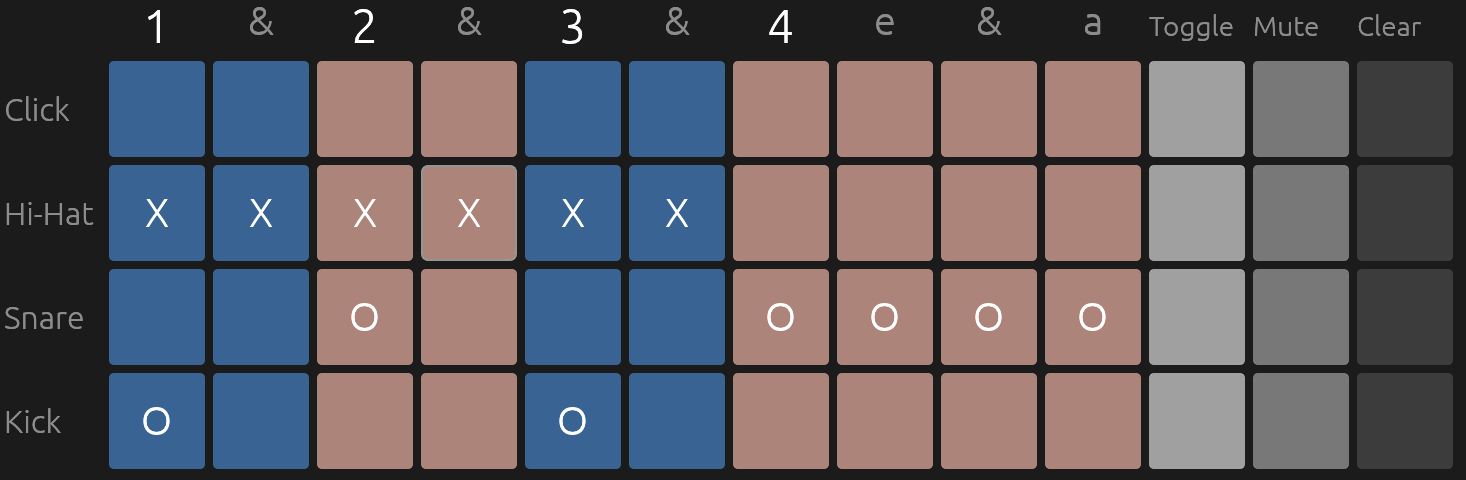
Next comes the core feature. A button allows you to orient the colorful grid either horizontally or vertically. Each cell in the grid acts as a button, displaying different sound options depending on the instrument. Pressing a grid button either adds a new sound or deactivates the sound for that specific beat position. Available sounds include four types of click sounds, open and closed hi-hats, and both soft and standard snare hits. The kick drum, however, is simply either active or inactive.
The Fold and Unfold buttons condense the grid to the essentials to save space. For instance, if I set the subdivision to 4, I get a sixteenth-note grid. In this example, let’s say I only use eighth notes for beats 1 through 3. Clicking Fold hides the unused sixteenth-note slots for beats 1 through 3, displaying only eighth notes. If beat 4 consists of a sixteenth-note fill (e.g., “straw-ber-ry-cake”), that beat remains unchanged.
The unfolded grid looks like this. 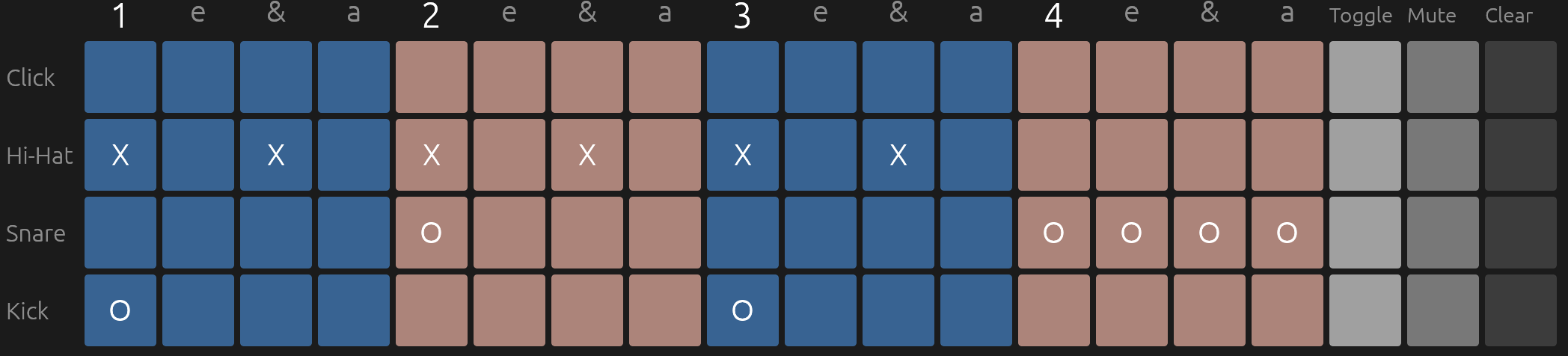 Clicking Fold turns it into this:
 Or try it out here.
The only way to save a grid configuration is to copy a link to your clipboard and save it. To do this, press the Copy Groove Link to Clipboard button.